
Zoom Subscription Redesign
Zoom Subscription Lifecycle Experience Optimization
During the pandemic, Zoom gained many individual users and small-to-medium business customers, but the overall business model long relied on sales teams, with self-service subscription systems relatively lagging. It was precisely these new small-to-medium business users who preferred to complete purchases and upgrades online independently, making the outdated online purchase flow gradually become a growth bottleneck: low conversion rates and high involuntary churn.
Role
Product Designer
Timeline
2023
Tools
Figma • Contentsquare • UserTesting
Core Add-on Conversion Rate
5% → 15%
Significant increase in user conversion rate for add-on purchases.
Checkout Conversion Rate
35% ↑
After core flow refactoring, purchase completion rate significantly improved.
Involuntary Churn Rate
17% ↓
Through billing center optimization, reduced accidental cancellations.
Subscription Lifecycle Overview
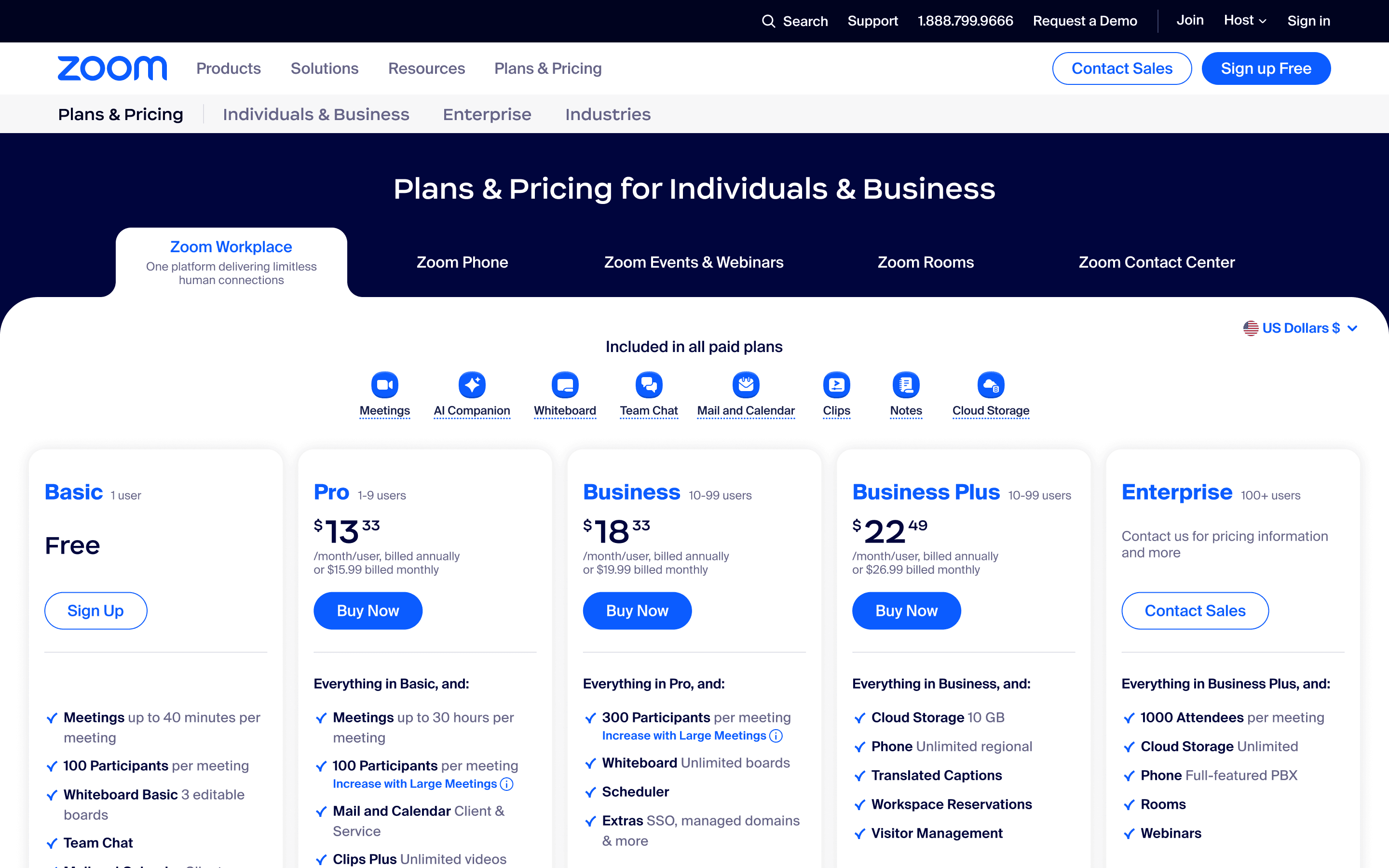
Pricing
From 'Just Buying Meetings' to 'Understanding and Purchasing Add-ons'
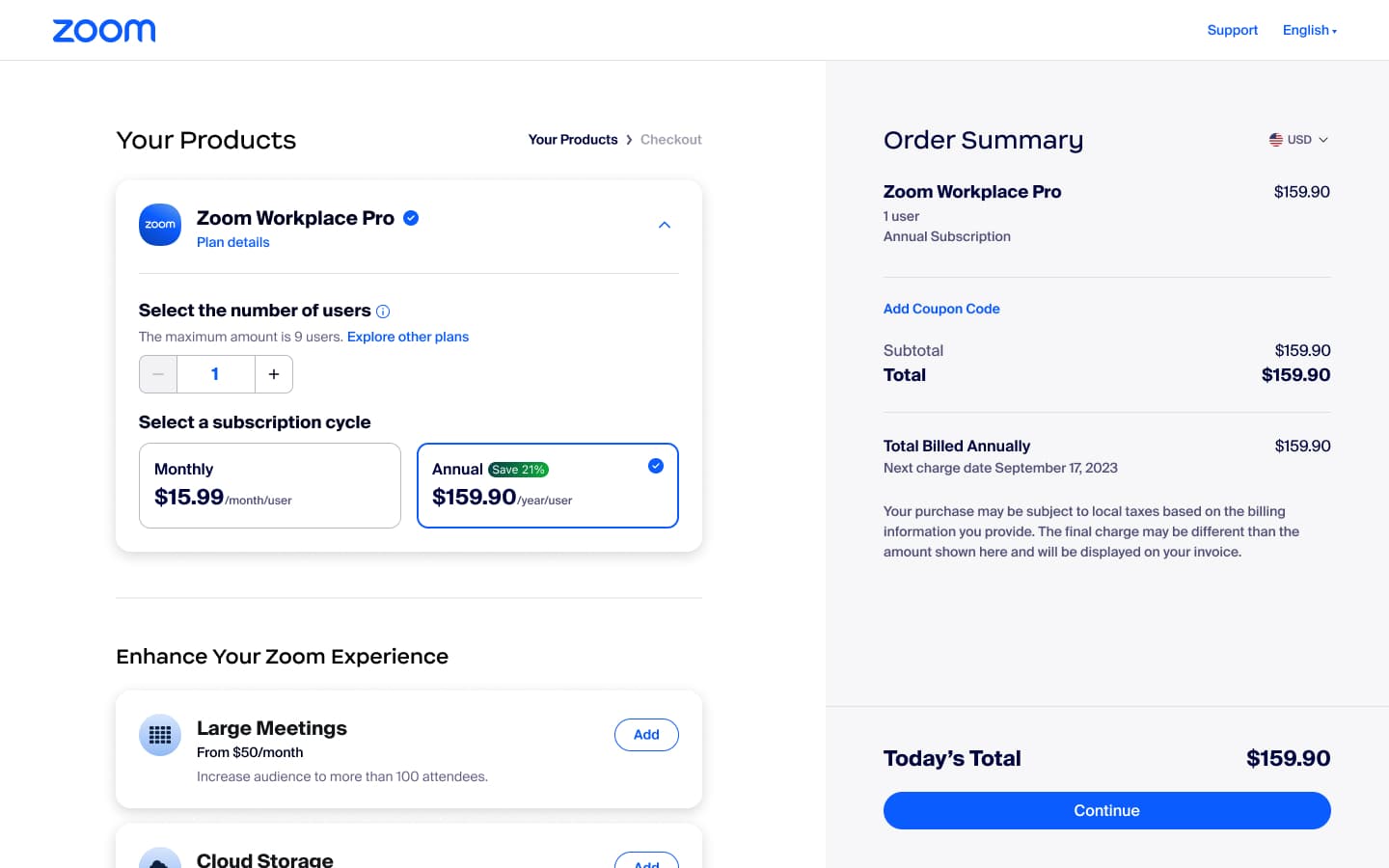
Checkout
From 'Long and Messy' to 'Clear and Smooth'
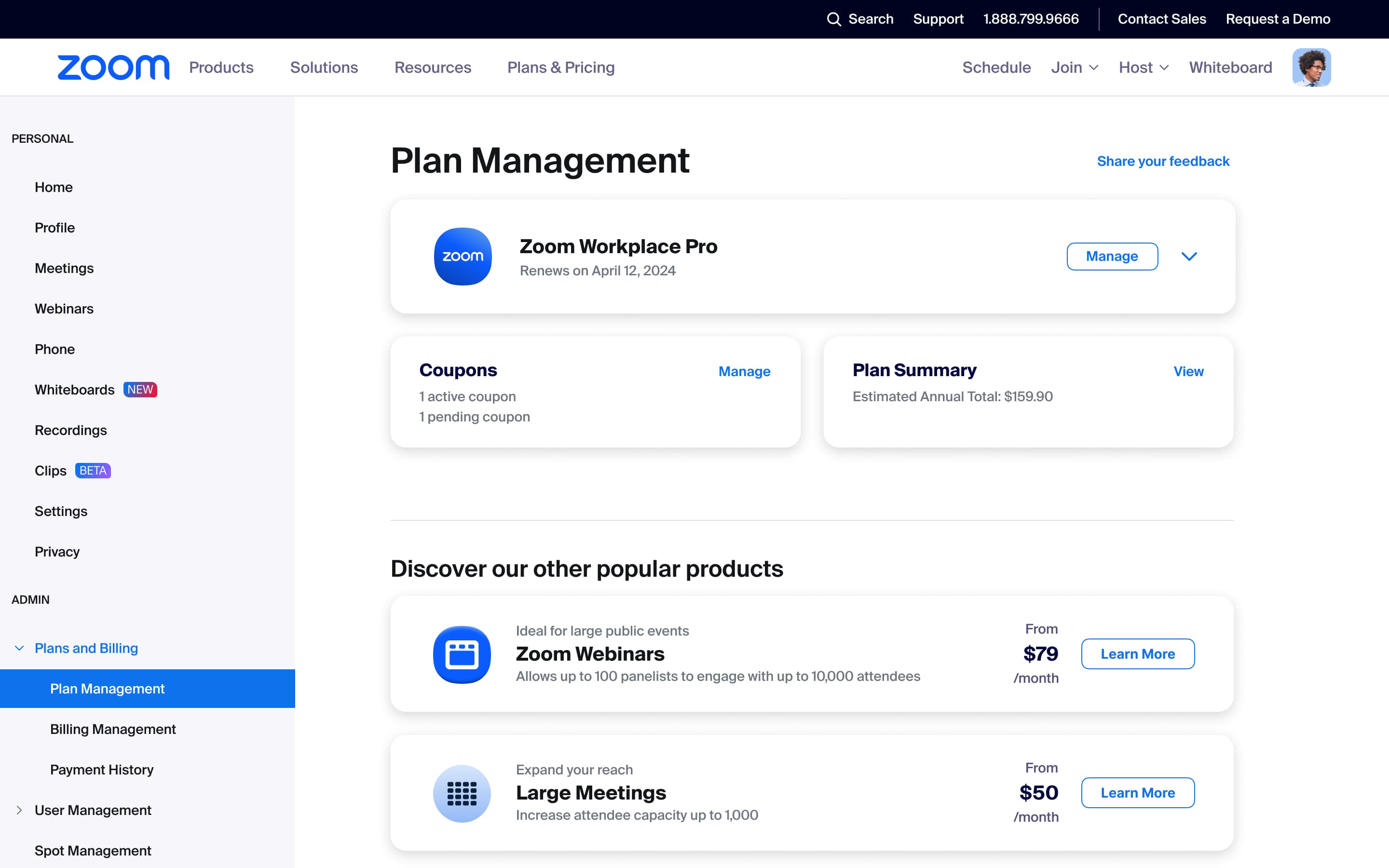
Billing
From 'Can't Understand, Don't Dare Change' to 'See Clearly, Dare to Operate'
Pricing: From 'Just Buying Meetings' to 'Understanding and Purchasing Add-ons'
Users only knew about Zoom Meetings and didn't understand the value of add-ons
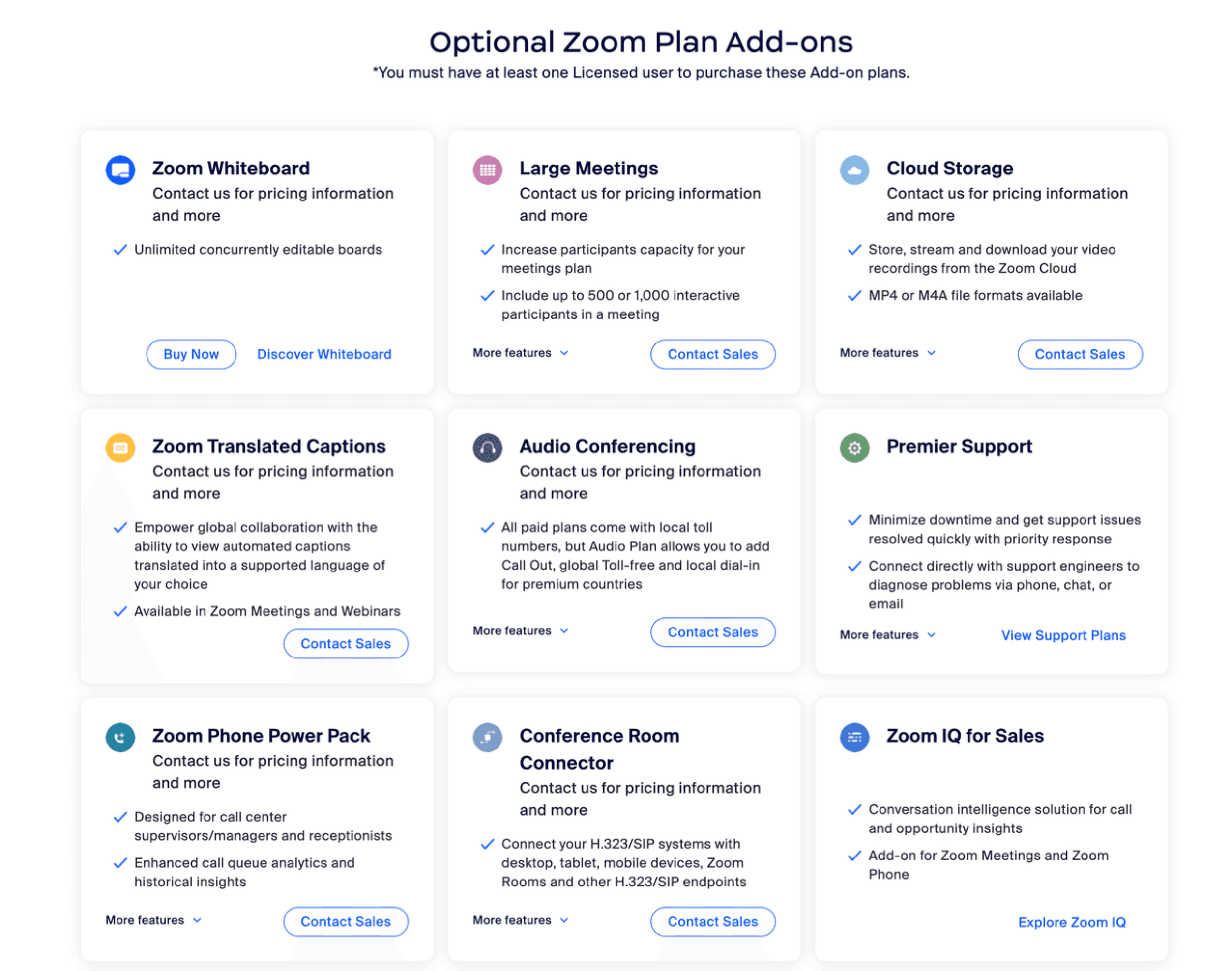
Data Side: Exposure Without Conversion
- Through analytics tools like Contentsquare, I discovered:
- Over 10% of users scrolled to the add-on section, but less than 1% clicked to purchase;
- Many users tried clicking cards or 'More features' but couldn't get more information.
- Even after clicking 'Buy Now', many users didn't complete the purchase.
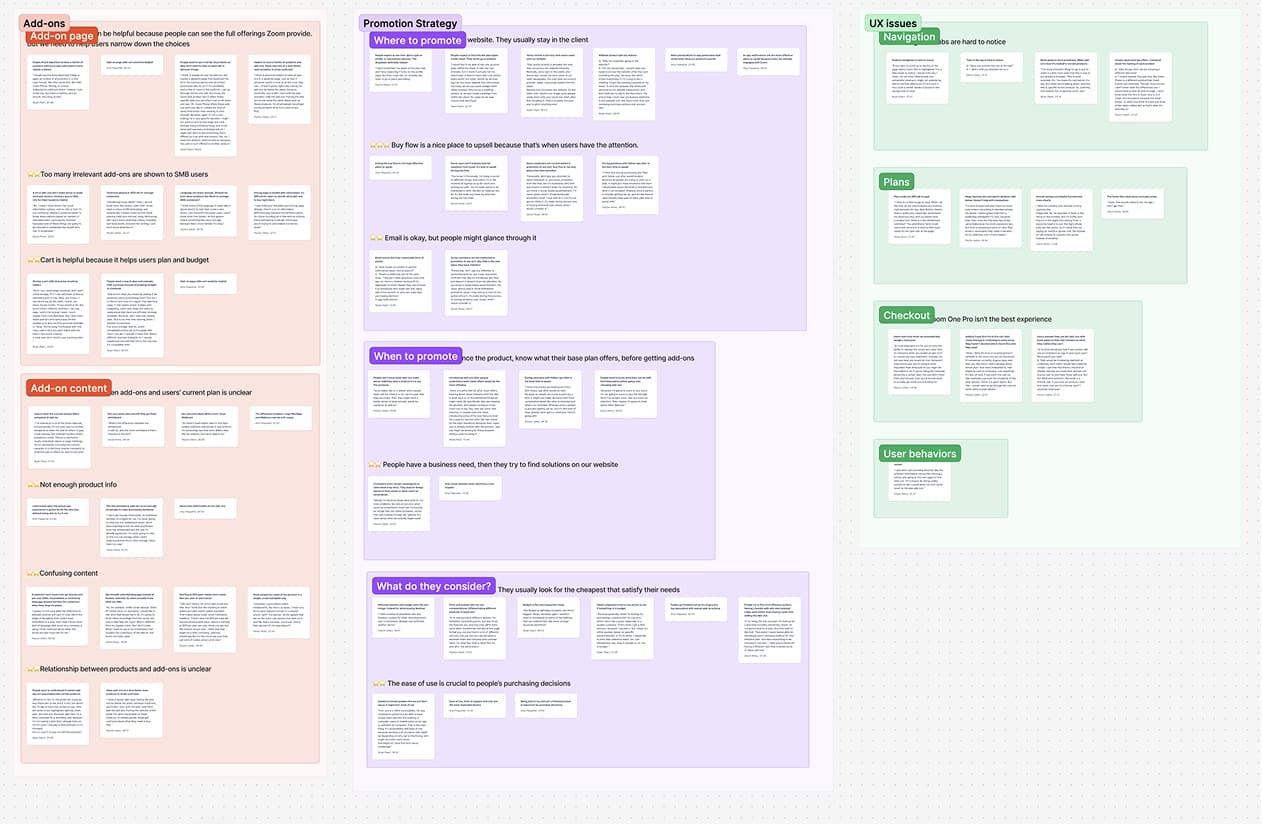
User Side: Couldn't Understand What Products Do
- Collaborated with user research to interview 6 small business owners / individual users, common feedback:
- Cards provided too little information;
- Copy was too abstract, seemed to talk about features rather than explaining what problems they solve.
"What does unlimited concurrently editable boards even mean? I mean you have a whiteboard product that people collaborate on. That's the key feature, right?"
Conclusion
"The pricing page mostly listed features without clearly explaining the use cases and business value of add-ons. Users lacked the information needed to make purchasing decisions."
Provide More Information, Deliver Value, Build Trust with Users
In interviews, users repeatedly mentioned that one reason they liked Zoom was: the interface is simple and easy to use, you can understand it at a glance. But this trust in 'ease of use' didn't extend to add-ons. Based on this insight, I developed three strategies:
Fill Information Gaps
Help users understand what problems add-ons solve and what they do
Value-Oriented
Reduce jargon and intuitively showcase product value
Decision Pre-positioning
Before entering checkout, users know roughly what plans, price ranges, and differences exist
Cards + Learn More Modal
- Added prominent 'Learn more' buttons to each add-on card.
- Clicking opens a modal with additional information.
- Ensures users can fully understand products without leaving the pricing page.
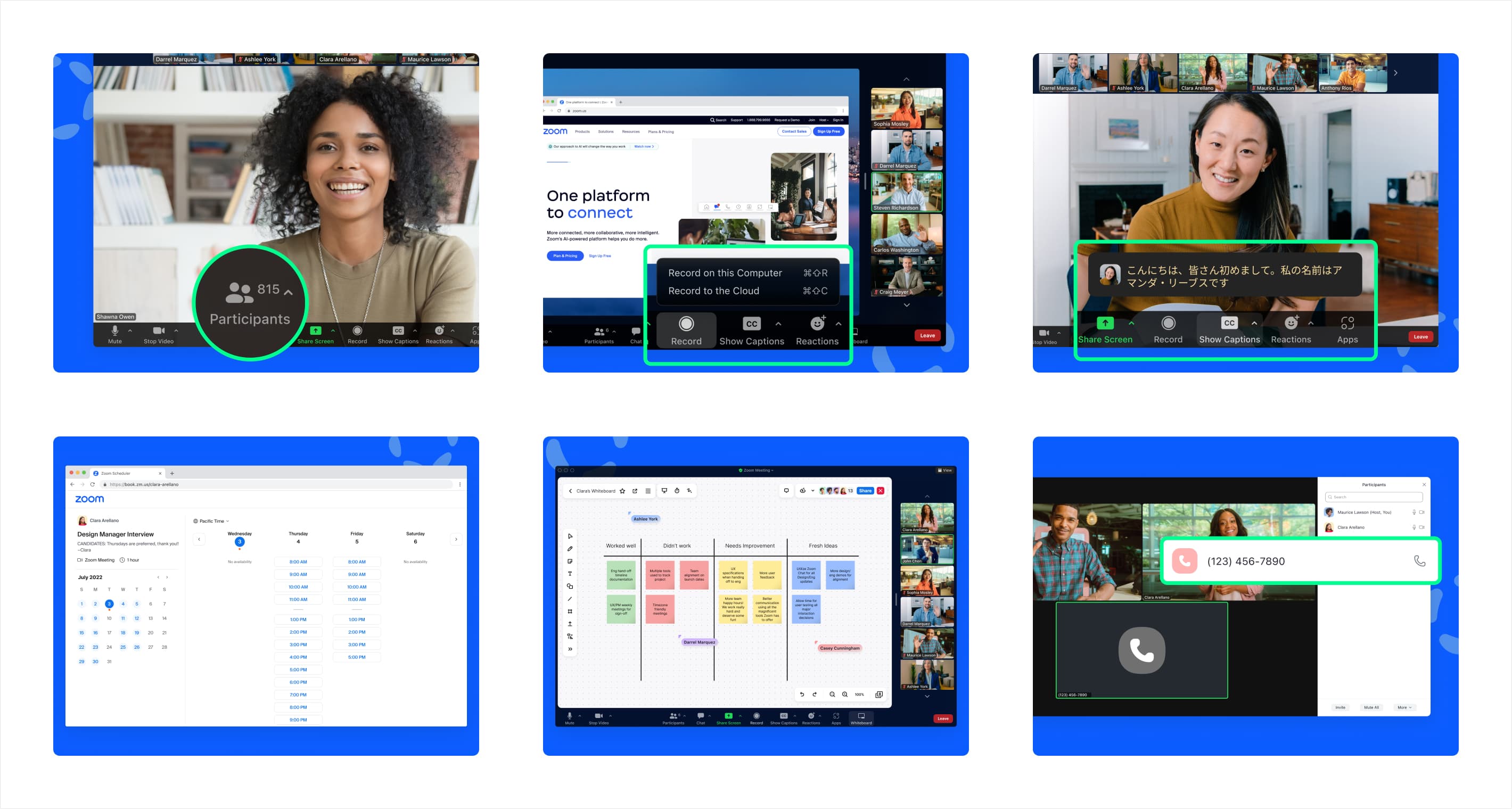
Help Users Understand Features at a Glance
- Included key UI screenshots in the Learn more modal so users can immediately see how the product works.
- I was responsible for cropping and layout, ensuring all images follow unified visual standards and highlighting rules, with each screenshot illustrating a key use case.
From 'Feature Jargon' to 'Business Benefits'
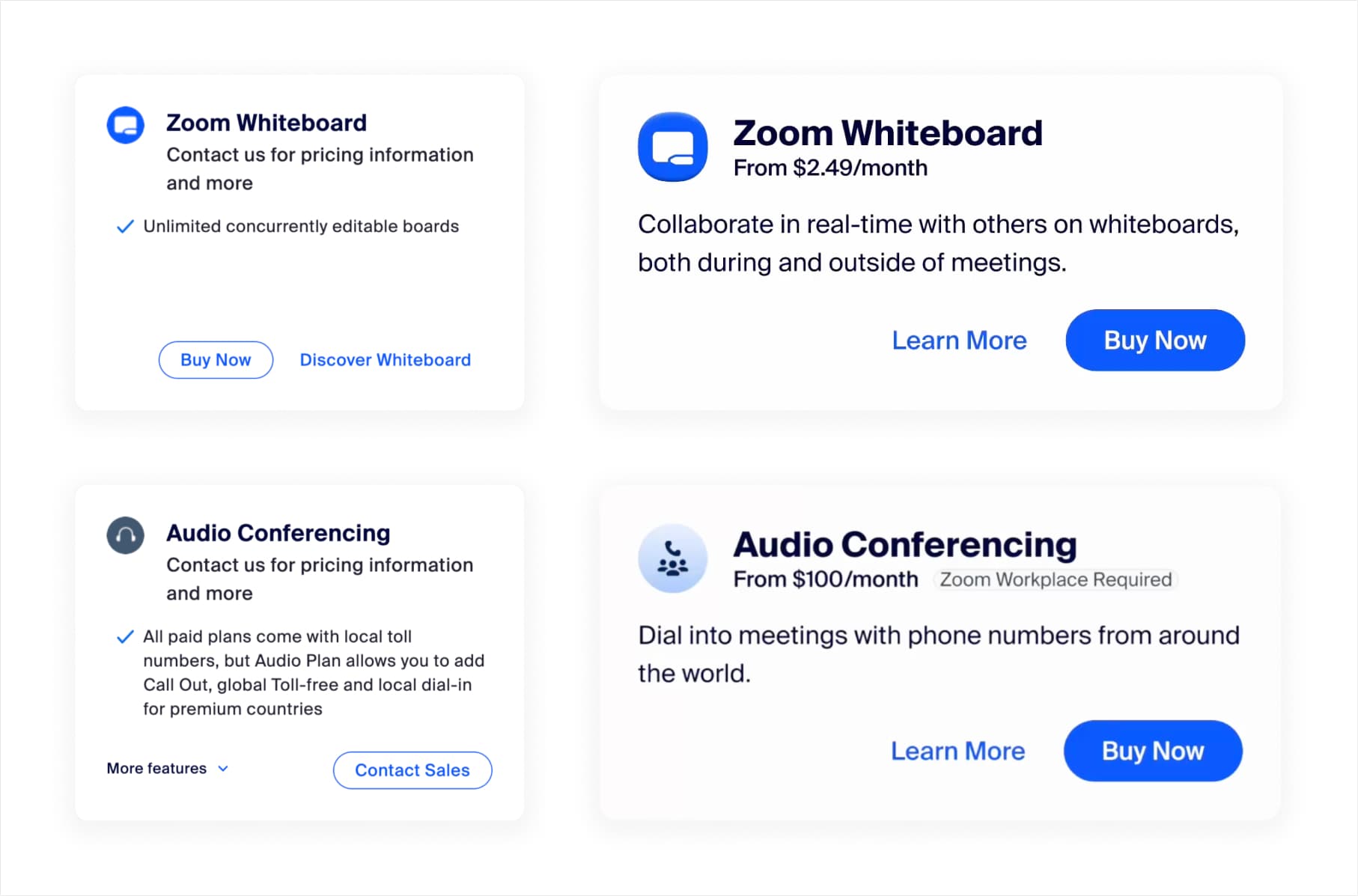
- Worked with PMs and copywriters to identify each add-on's core value, rewriting internal/technical language into user-friendly language.
- Before: Unlimited concurrently editable boards.
- After: Collaborate in real-time with others on whiteboards, both during and outside of meetings.
Expose Price Ranges for Different Plans Upfront
- For products with multiple plan tiers, explain the main differences and price ranges for each tier in the Learn more modal.
- Give users a mental model of 'which tier do I need and roughly how much will it cost' before entering checkout, reducing mid-flow abandonment.
Core Add-on Conversion Rate
5% → 15%
Conversion rate for best-selling add-ons increased from 5% to 15%.
User Interaction with Add-ons Conversion Rate
11% ↑
Users who opened the modal had a higher probability of conversion.
My Contributions
- Identified key problems and opportunities for add-ons through data and user interviews.
- Coordinated designers across product lines to audit existing interfaces and compile a complete Figma library.
- Designed and delivered 12 complete modal designs.
- Established unified add-on modal standards and promoted their application across pricing page, checkout, and billing center.
Checkout: From 'Long and Messy' to 'Clear and Smooth'
Core Challenge: Too Many Fields, Heavy Legacy Burden
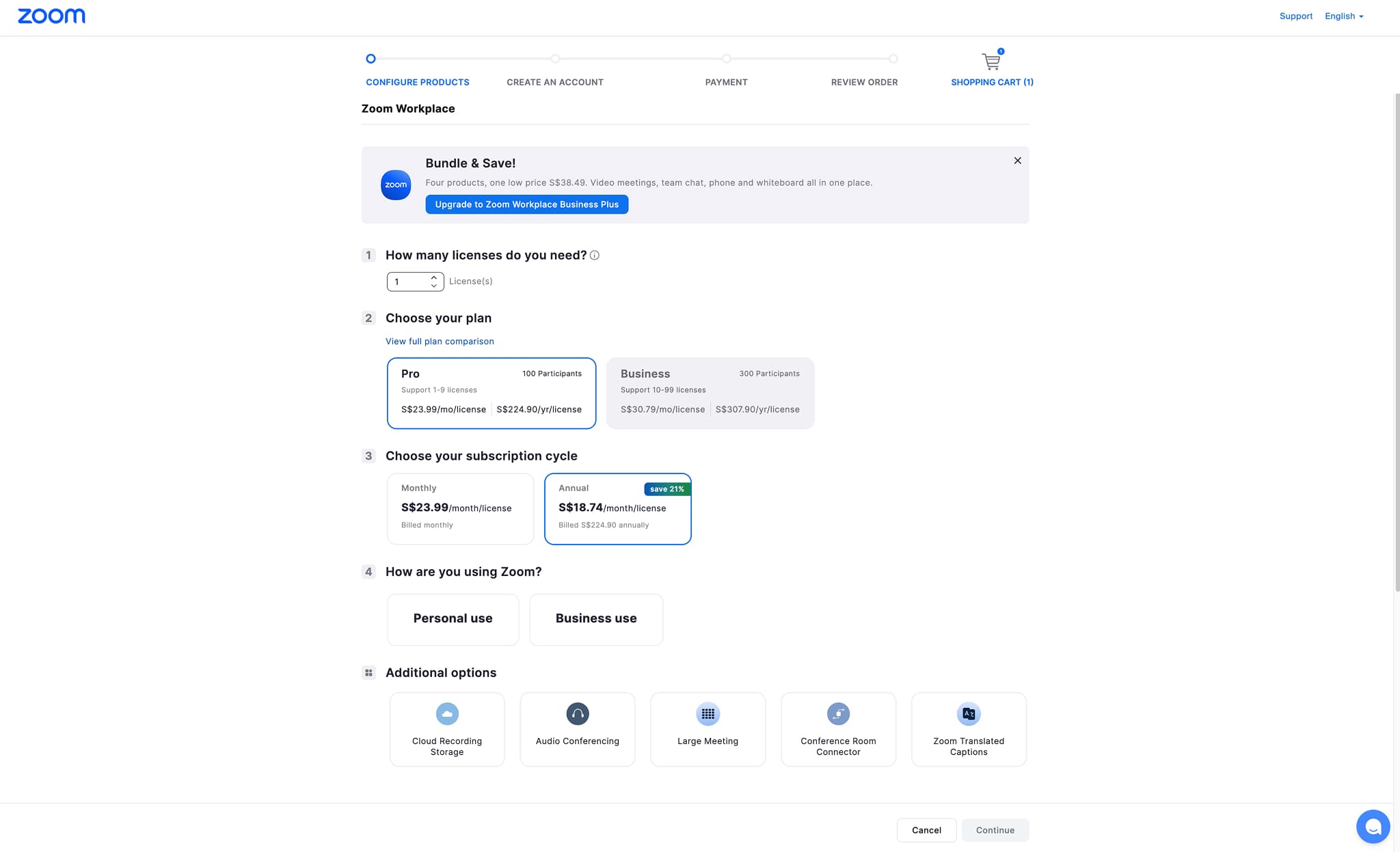
User Pain Point: Form Seemed Endless
- The original checkout flow was split into 5 steps, each requiring many fields to fill.
- Funnel data showed significant drop-off at each layer, with low overall conversion rate.
- User interviews frequently mentioned: 'Seeing so many fields to fill makes me want to close it.'
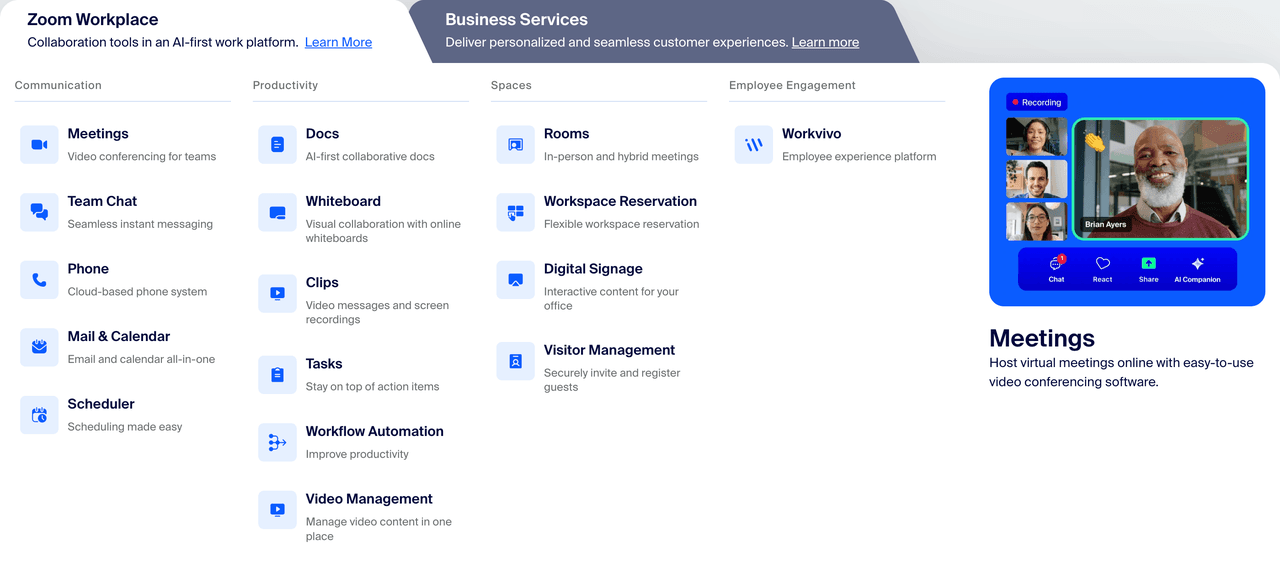
Complex to Push Forward: Dozens of Products, Cross-country Regulations, No One Dared Touch It
- Involved dozens of products and hundreds of configurations.
- Different countries and regions have their own legal and compliance rules.
- Engineering estimated that changing the entire flow would take years of work.
Conclusion
"On the user side, lengthy forms severely reduced purchase intent; but internally, the checkout flow involved many historical issues, making it extremely difficult to push for change."
Simplify Decisions, Incremental Refactoring
From funnel data and interviews, we confirmed problems centered on overly long flows and information overload. We chose to compress steps, using small experiments to prove results and gain space for subsequent refactoring. Then through card-based product configuration and progressive forms to break down massive fields, letting users handle one small piece of information at a time. Finally, for mobile, we reorganized information hierarchy and interaction paths, migrating the same pattern to small screens, so both desktop and mobile can complete purchases with the same clear, lightweight approach.
Small Validation
First select the smallest scope, highest impact module for testing, using results to push the team toward bigger changes.
Progressive Forms & Card-based
Use card-based product configuration + progressive forms, presenting information in small chunks to avoid the frustration of 'endless forms'.
Mobile Adaptation
After desktop testing succeeded, migrate the same pattern to mobile so different platforms have the same experience.
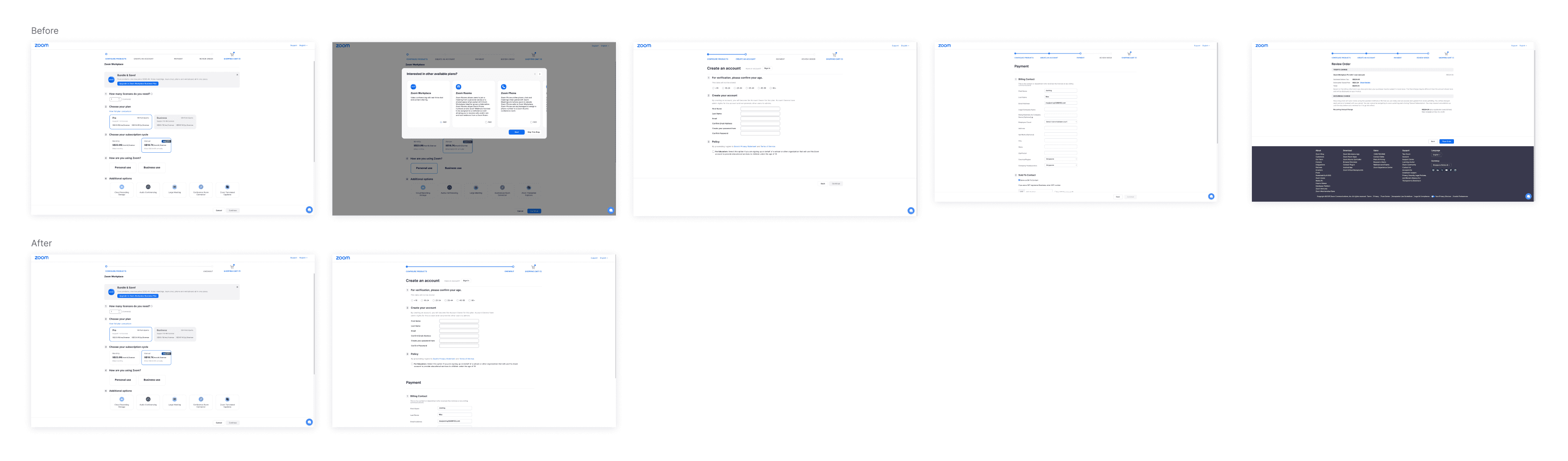
Minimal Validation: From 5 Steps → 2 Steps
- Aligned with PMs, legal, and engineering field by field: which fields are mandatory, which are legacy, which can be filled after purchase.
- Based on alignment results, created an MVP version with only core fields, compressing the flow to two steps: 1. Product Configuration 2. Account & Payment Information.
- Result: Conversion rate increased by over ten percentage points; more importantly, it provided team confidence for subsequent more thorough refactoring.
Card-based Products + Progressive Forms
- While MVP improved conversion, it was still 'deleting fields within the old framework,' lacking reusable design language.
- Encapsulated each product configuration as a collapsible/expandable card, so when adding new products in the future, just add a new card without overhauling the page structure.
- At any moment, only show the parts that need to be filled, with different user types split early.
Unified Experience with Desktop
- Designed collapsible order information for small screens, only exposing the amount to pay.
- Configured targeted keyboards for different input fields, making form filling smoother for users.
Checkout Conversion Rate
35% ↑
In the core flow refactoring experiment, overall conversion rate increased by approximately 35%.
Mobile Conversion Rate
5% → 30%
Mobile conversion significantly improved, contributing nearly 15% of revenue.
My Contributions
- Worked with PMs, engineering, and legal to break down mandatory vs. post-purchase information, advocating for better user experience.
- Built the complete checkout flow from 0 to 1, delivering both desktop and mobile designs.
- Established card-based / progressive form component system, documenting it as a reusable template.
Billing: From 'Can't Understand, Don't Dare Change' to 'See Clearly, Dare to Operate'
Core Challenge: Entry Hard to Find, Status Unclear, Permission Logic Opaque
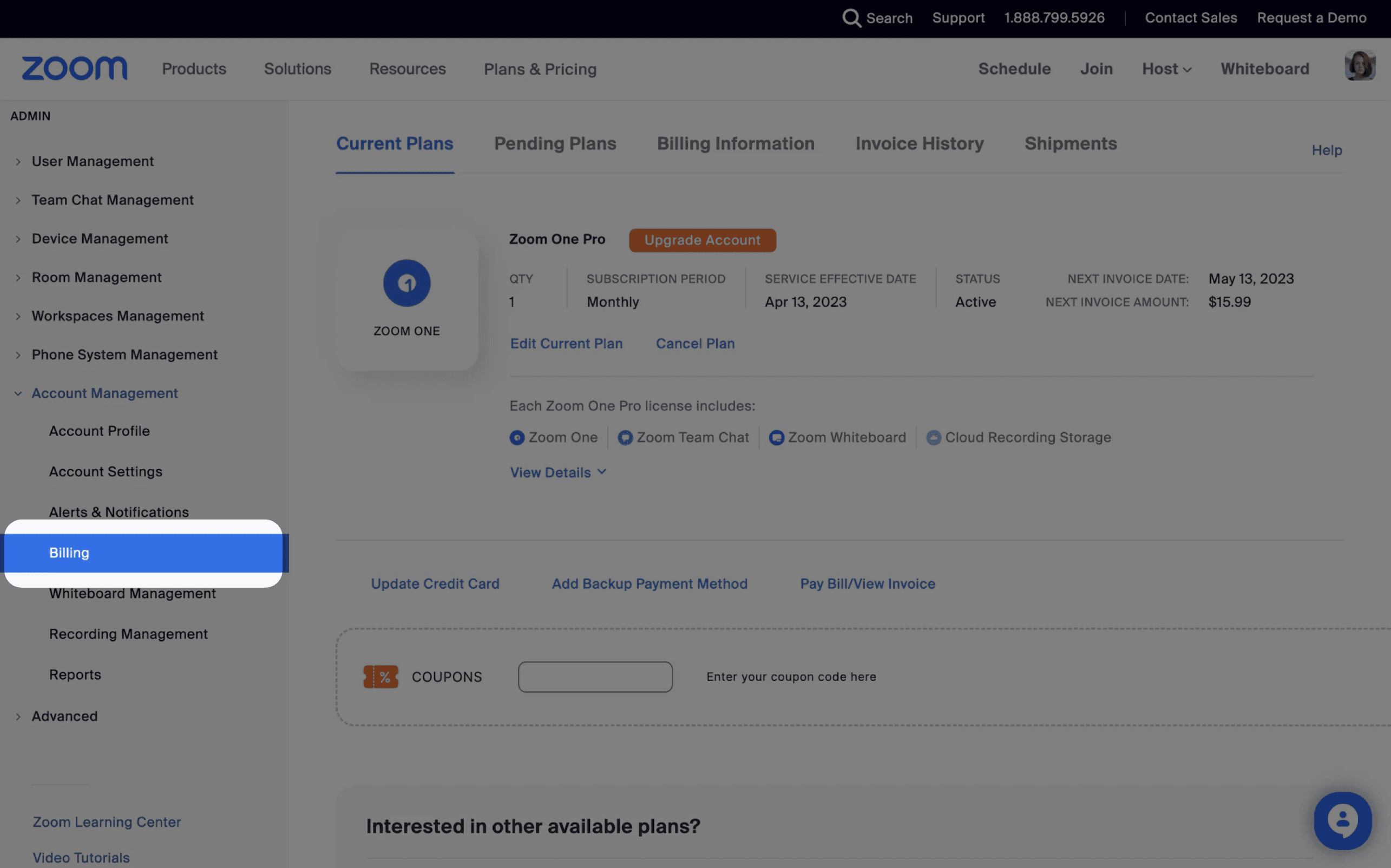
Missing Entry
- In the admin panel, designers from each product line added their own tabs, burying subscription and billing entries in second or third-level menus.
- The vast majority of users didn't know where to manage their subscriptions.
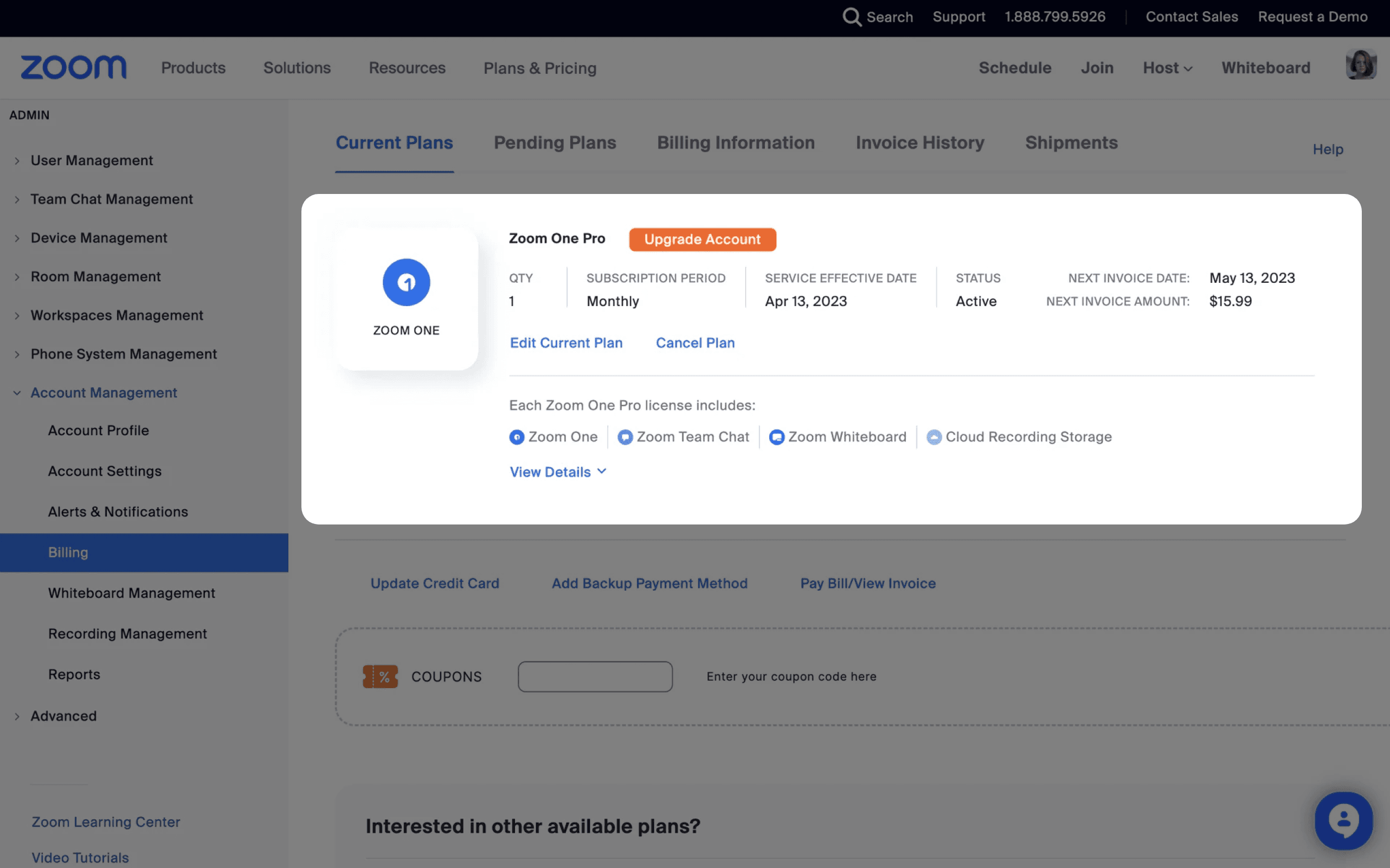
Messy Information + Unclear Permissions
- After entering the page, fields, history records, and status labels were mixed together, with lists and details merged into one.
- Permission and contract logic was complex. Some users couldn't edit in the frontend, but the interface didn't explain why, causing many support tickets and customer service costs.
Conclusion
"Users had difficulty extracting useful information from the existing design, and even when they did, they didn't know what operations they could perform."
Move Entry Forward + Information Layering + Clear Permission Expression
When managing subscriptions, users only want to know: where am I, what do I have, what can I do next.
Move Entry Forward
Place the billing entry in the first level of navigation and avatar menu, ensuring users find it immediately.
Layered Information Display
List layer shows 'now'—product, cycle, next charge. Detail layer shows 'all'—configuration, invoices, history.
Clear Permission Expression
Clearly indicate which users can modify online and which need human support, using UI prompts to show next steps.
Modify Information Structure, One-Click Access from Avatar
- Users frequently asked 'where is my subscription' in support tickets, while the admin panel navigation kept getting filled as product lines expanded.
- Added a first-level 'Billing / Subscription Management' entry in the admin panel.
- Added a 'Billing Center' entry in the avatar dropdown for both Zoom client and Web.
- Conducted quick usability testing with 7 users using Figma prototypes, achieving 100% task success rate.
List Shows 'Now', Details Show 'All'
- List layer only shows information truly needed for decision-making: product name, current plan / billing cycle, next charge / expiration date, status labels.
- Defined list/detail hierarchy rules and status label system, making new product additions more standardized.
Clarify 'Who Can Change Online, Who Must Go Through Human Support'
- Worked with PMs and engineering to establish a clear set of rules: which users can upgrade online, which users must modify through sales or customer support.
- For scenarios that can be operated online, provide clear action entry points.
- For scenarios that cannot be operated online, explain the reason and provide next step suggestions.
Billing Center Entry Usability Test
100%
All 7 users successfully found the entry.
Involuntary Churn Rate
7.2% → 5.8%
Churn due to payment failures significantly decreased.
My Contributions
- Refactored admin panel navigation and client avatar entry, unifying billing entry points.
- Designed list / detail layering and permission prompt patterns, enabling users to confidently make changes online.
- Led subscription card and detail display standards, supporting incremental rollout strategy.
Lessons Learned
This project wasn't a 'one-time major redesign,' but gradually evolved into a unified perspective and reusable assets.
Unified Subscription Lifecycle Perspective
Pricing, checkout, and billing are no longer three separate pages, but different nodes in the same journey.
My Role
Mindset Shift
Reusable Components & Patterns
Add-ons (cards + modals), checkout (card-based + form grouping), billing (list + details).
My Role
Component Library Development
Cross-product Design Standards & Collaboration Mechanisms
UI screenshot acquisition agreements, card information structure standards, new plan integration methods.
My Role
Process Standardization
My Learnings
What I Learned
- 01From redesigning pages to designing subscription loops: start from subscription models and business goals, then break down to interfaces.
- 02Making clear trade-offs in highly constrained environments: treat risk control / compliance / tax as design inputs, distinguish what can be changed now, what must be kept, and what can be done in the future.
- 03Using experiments and data to buy reform space: first validate direction with small MVP experiments, then amplify effects with structural redesigns, letting metrics speak.
How I Grew
- 01Learned how to truly connect 'experience' with 'revenue / churn'.
- 02Stopped assuming 'if there were no risk control and compliance it would be perfect,' instead learned to design within constraints.
- 03Made it easier for teams to accept and reuse design decisions.